Spiral Patterns - Collection
Spiral patterns have fascinated artists, scientists, and designers for centuries—not just for their visual elegance, but for their deep resonance with natural growth, motion, and balance. The Spiral Patterns - Collection brings that timeless geometry into your creative workflow with precision, flexibility, and real-world readiness. This isn’t a generic set of clipart swirls. It’s a thoughtfully assembled, production-grade resource built for professionals who need consistency, scalability, and versatility—without compromise.
What You’re Actually Getting (No Surprises)
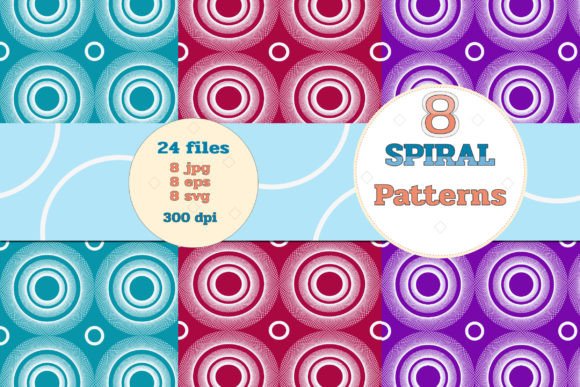
The Spiral Patterns - Collection includes 8 distinct spiral designs—each delivered in three editable, high-fidelity formats: JPG, EPS, and SVG. That means you’re covered whether you’re prepping files for offset printing, building responsive web elements, or refining vector paths in Affinity Designer. All files are rendered at 300 DPI and sized to 2800 × 2800 pixels—large enough for fine-detail print applications like book covers or wall murals, yet clean and optimized for digital use.
Each spiral is crafted in RGB color space, ensuring accurate on-screen previewing and reliable conversion to CMYK when needed for professional print output. No rasterized edges. No hidden layers. No placeholder fonts or locked assets. Just clean, ready-to-deploy vector geometry and crisp raster counterparts.
Why Format Variety Matters More Than You Think
Having the same design in JPG, EPS, and SVG isn’t about redundancy—it’s about future-proofing your projects. Here’s how it plays out:
- JPG files work instantly in Canva, PowerPoint, or WordPress—ideal for quick mockups, social media banners, or printable handouts where editability isn’t required.
- EPS files retain full vector fidelity across Adobe Illustrator, CorelDRAW, and Affinity Designer. You can recolor, resize infinitely, or extract individual path segments without quality loss—critical for logo adaptation or branded stationery.
- SVG files integrate natively into modern websites and apps. They scale responsively, load faster than PNGs, and support CSS animation—perfect for interactive UI elements, animated loaders, or subtle background flourishes that adapt to any screen size.
This multi-format approach saves hours per project. You won’t waste time tracing, resampling, or converting—just drop, adjust, and deploy.
Real Applications—Across Roles and Industries
Whether you're designing a yoga studio’s newsletter, launching an indie publishing imprint, or crafting learning materials for middle school science, spirals carry quiet communicative power. Their organic flow suggests growth, continuity, and curiosity—qualities that translate meaningfully across contexts.
For Educators & Curriculum Designers
Use spiral motifs in infographics explaining DNA structure, galaxy formation, or Fibonacci sequences. The consistent 2800px resolution ensures clarity even when projected on classroom screens or printed as large wall charts. SVG versions let you animate rotation or zoom for interactive lessons—no coding required if using tools like H5P or Webflow.
For Marketers & Small Business Owners
A subtle spiral border on a product label or email header adds sophistication without clutter. Because all files are print-ready, you can confidently apply them to packaging, business cards, or trade show backdrops—knowing they’ll hold crisp detail at any size. One designer used the tightest spiral from this collection as a repeating pattern on custom tissue paper for a boutique skincare line—customers consistently mentioned its “calming, intentional feel.”
For Web & UI Designers
SVG spirals function beautifully as loading indicators, section dividers, or hover effects. Unlike icon fonts or Lottie animations, these require zero external dependencies—just embed the code and style with CSS. One agency embedded a modified version as a dynamic scroll-triggered reveal on a sustainability report landing page, reinforcing themes of cyclical renewal.
For Print Crafters & Hobbyists
If you work with decoupage, scrapbooking, or resin art, the JPGs offer immediate usability—print them on specialty paper, cut with precision, and layer without pixelation. The EPS files also allow you to isolate single arms of a spiral in Illustrator, then convert them into custom cutting paths for Cricut or Silhouette machines.
Practical Considerations Before You Use Them
Not every spiral works for every purpose—and that’s by design. The Spiral Patterns - Collection includes variations in density, stroke weight, and rotational rhythm. A tightly wound Archimedean spiral reads as precise and technical; a looser logarithmic version feels more organic and open. Test them in context:
- For text overlays, choose spirals with generous negative space—avoid busy center clusters that compete with legibility.
- When scaling down for favicons or app icons, lean on the SVG versions and simplify via path reduction (Illustrator’s “Simplify” tool works well).
- If matching brand colors, start with the EPS or SVG files—they preserve vector fills, making global color swaps effortless.
- For wallpaper use, tile one spiral across a grid—but check alignment manually. Not all spirals repeat seamlessly edge-to-edge, so slight rotation or offset may be needed for true continuity.
Efficiency Without Sacrificing Integrity
This collection avoids common pitfalls: no overused stock motifs, no inconsistent line weights, no mismatched color profiles. Each file was tested across real workflows—from exporting CMYK PDF/X-4 for commercial printers to embedding SVGs in Next.js apps with inline styling. What results is reliability you can build upon—not around.
You’ll notice small but meaningful details: subtle anti-aliasing on JPG exports, centered registration points in SVGs, and EPS files saved with legacy compatibility (CS6+) so older design suites don’t choke on newer features. These aren’t cosmetic touches—they’re signs of craft, not convenience.
Final Thought: Spirals Are Tools, Not Just Ornaments
A spiral isn’t just decorative. In layout, it guides the eye. In branding, it implies evolution. In education, it models systems thinking. The Spiral Patterns - Collection gives you that functional depth—not as abstract theory, but as ready-to-use assets grounded in practical constraints and creative possibility. Whether you’re iterating a pitch deck at midnight or hand-lettering a wedding invitation, having eight rigorously built, format-flexible spirals means less time troubleshooting and more time expressing what matters.