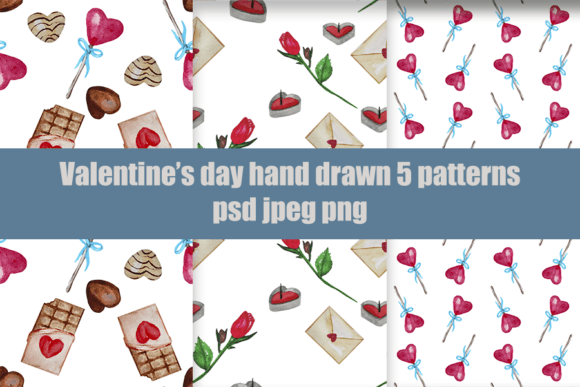
Valentine’s Day Patterns for Real-World Creative Work
Valentine’s Day Patterns are not decorative fillers—they’re production-ready design assets built for integration. Each pattern is drawn by hand, refined manually in Photoshop, and delivered at 4000 × 4000 px in three essential formats: layered PSD files for editing, high-fidelity JPGs for quick use, and transparent-background PNGs for flexible layering. All sublimation-ready versions are output at 300 DPI—ensuring crisp, professional results on tableware, textiles, stationery, posters, stickers, and more.
How Valentine’s Day Patterns Fit Into Your Workflow
These patterns don’t exist in isolation. They slot into real creative and business processes—before a launch, during production, or after a client brief. A small-batch ceramicist might use them to mock up mug designs before ordering decals. A stationery brand could drop a pattern into a Canva template to generate holiday greeting cards in under ten minutes. An educator preparing a classroom Valentine’s activity might print a pattern onto cardstock for cut-out crafts—knowing the transparency in the PNG ensures clean edges without white halos.
The manual creation process matters here. Because every motif—roses, interlocking hearts, lace-inspired borders, minimalist arrows, or botanical swirls—is drawn freehand and edited personally in Photoshop, there’s consistency in line weight, spacing, and rhythm. That translates directly to usability: no awkward scaling artifacts, no mismatched repeats, no pixelated edges when enlarged for wall-sized prints.
Before the Project: Planning with Precision
Start early—not with software, but with intention. Ask: What surface am I printing on? What’s the minimum repeat size needed? Will this be viewed up close (like a notebook cover) or from a distance (like a banner)? Valentine’s Day Patterns are designed with scalability in mind, but your prep determines how smoothly they integrate. For example, if you’re screen-printing on fabric, open the PSD file and verify that layers are named clearly (e.g., “Base Motif,” “Shadow Overlay,” “Accent Dots”)—so you can isolate elements for color separation. If you’re prepping for sublimation on mugs, confirm your printer profile supports the embedded color space in the JPG—most do, but checking avoids mid-run surprises.
Organize your library proactively. Save each pattern set in a dedicated folder with consistent naming: Valentines_Lace_Repeat_4000px_PSD, Valentines_Botanical_Transparent_PNG. This saves time later—especially when juggling multiple clients or seasonal product lines.
During Execution: Editing, Adapting, and Aligning
The layered PSD files are where customization happens. You’re not stuck with preset colors or fixed densities. Adjust hue and saturation non-destructively using adjustment layers. Swap out background tones to match brand palettes—or remove them entirely using the transparent PNG. Need a tighter repeat for napkin prints? Use Photoshop’s Offset filter (Filter > Other > Offset) to test tile alignment, then refine edges manually with the Clone Stamp or Healing Brush.
For digital-first uses—like social media templates or email headers—the JPG version offers fast drag-and-drop compatibility. But remember: JPGs don’t support transparency. If your layout requires overlays (e.g., text sitting cleanly over a heart motif), reach for the PNG instead. It’s not about choosing the “best” format—it’s about matching format to function.
Consistency across applications matters most when building a cohesive collection. If you’re designing a full Valentine’s product suite—mugs, coasters, gift tags, and wrapping paper—use the same base pattern across all items. Vary only scale, color, or cropping. That visual continuity reinforces brand recognition and reduces decision fatigue during production.
After Delivery: Quality Control and Long-Term Use
Before sending files to print or handoff, run a quick QC checklist:
- Zoom to 100% in Photoshop and scan for stray pixels or misaligned tiles.
- Open the JPG and PNG side-by-side—confirm color fidelity matches your monitor profile.
- Test the PNG on a dark and light background to verify transparency renders cleanly.
- If using for sublimation, check that no layer effects (like outer glows) were accidentally flattened into the JPG.
Long-term, these patterns hold value beyond February. Their hand-drawn authenticity gives them timeless texture—unlike AI-generated repeats that can feel generic or over-smoothed. Re-purpose a delicate rose motif for spring branding. Flip a heart-based pattern vertically to create a subtle “love note” background for wedding stationery. Archive your edits as new PSD versions (e.g., Valentines_Rose_Spring_Edit.psd) so original files remain untouched for future reuse.
Integration With Tools and Teams
Valentine’s Day Patterns work cleanly inside common ecosystems. Designers using Figma can import PNGs as image fills or use JPGs in auto-layout frames. Print-on-demand platforms like Printful or Gelato accept JPG and PNG uploads without conversion—just ensure dimensions meet their minimum requirements (4000 px exceeds most thresholds comfortably). For marketers building Mailchimp campaigns, embed the PNG directly into HTML modules—no extra CSS needed for transparency.
If you’re collaborating, share the PSD with your team—but also export a PDF contact sheet showing all pattern variations at actual size. That gives copywriters, project managers, or clients visual context without requiring Photoshop access. It bridges technical and non-technical roles efficiently.
Practical Tips for Smoother Implementation
Match resolution to purpose. While all files are 4000 × 4000 px, that doesn’t mean you always need the full size. For Instagram posts (1080 × 1080 px), resample down—but do it in Photoshop using Bicubic Sharper to preserve crispness. For large-format posters, keep the native resolution and let your print provider handle scaling.
Preserve editability. Never flatten the PSD unless absolutely necessary. Keep type layers separate if you’ve added labels for internal reference. Save flattened exports as new files—never overwrite the master.
Test on real materials. A pattern that looks balanced on screen may shift on ceramic or cotton. Order one physical sample first—especially if you’re launching a new product line. Note how shadows fall, how colors shift under lighting, and whether fine details survive the transfer process.
Track usage rights. These illustrations are licensed for commercial use—including resale on physical goods—but not for redistribution as standalone clipart or pattern packs. That means you can sell mugs printed with the design, but you can’t resell the PNG file itself on Etsy. Clear boundaries protect both creator and buyer.
Why Handmade + Photoshop Makes a Difference
Automation speeds things up—but it rarely adds nuance. Each Valentine’s Day Pattern begins with pencil on paper or stylus on tablet, then moves into Photoshop for deliberate refinement: adjusting contrast between foreground and background motifs, fine-tuning repeat offsets by single-pixel increments, cleaning up anti-aliasing on curves. That human-in-the-loop step ensures warmth, variation, and intentionality—qualities that resonate with customers who notice texture, rhythm, and care.
You’ll see it in the way a vine curls naturally around a corner, not just repeats rigidly. In how shadow layers sit softly beneath hearts instead of casting harsh, computer-perfect gradients. In the slight irregularity of hand-drawn dots that mimic real stamping—not sterile vector perfection. That’s what supports long-term brand authenticity: assets that feel made, not generated.
Thank you for supporting handmade design work. Every download helps sustain thoughtful, manual illustration practice—and ensures future pattern sets stay grounded in craft, not algorithms. If you have questions about licensing, color matching, or adapting a pattern for a specific substrate, feel free to reach out directly.