Seamless Christmas Patterns Pack: A Practical Guide for Designers and Crafters
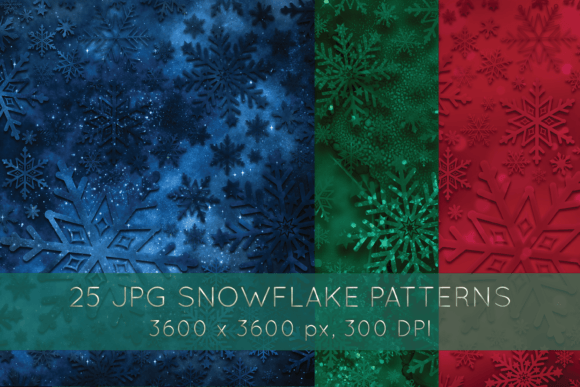
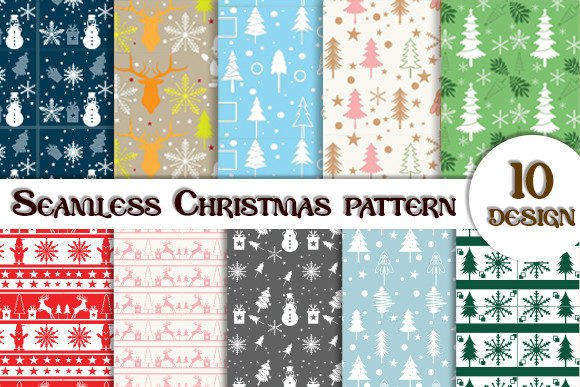
A Seamless Christmas Patterns Pack is a curated digital collection of repeatable holiday-themed graphics—think snowflakes, holly sprigs, reindeer silhouettes, candy canes, and vintage ornaments—designed to tile infinitely without visible seams. Unlike standalone clipart or isolated icons, these patterns are built for scalability and repetition, making them ideal for backgrounds, wrapping paper, fabric prints, greeting cards, web banners, and packaging design. What sets this pack apart isn’t just seasonal relevance—it’s the intentional construction of each motif to align perfectly at tile edges, saving hours of manual alignment and ensuring professional-grade output.
What You Actually Get—and Why Format Matters
The Seamless Christmas Patterns Pack includes two essential file types: an editable EPS file and a high-resolution JPG file at 300 DPI. This dual-format approach reflects thoughtful preparation for different workflows.
- EPS (Encapsulated PostScript): A vector-based format that retains full editability in Adobe Illustrator and compatible software. You can recolor individual elements, adjust spacing, scale infinitely without pixelation, or extract single motifs for custom compositions. This is indispensable if you’re adapting patterns for branded merchandise, adjusting proportions for fabric yardage, or integrating into layered print layouts.
- JPG at 300 DPI: A raster file optimized for immediate use in non-vector environments—like Canva, Photoshop, or desktop publishing tools that don’t support EPS. Its resolution ensures crisp printing on physical products such as gift tags, stationery, or small-batch stickers. It’s not meant for massive enlargements, but it’s reliable for standard print sizes up to 12×12 inches.
Neither format includes fonts, mockups, or layered PSD files—so expectations should be set accordingly. If your project demands animated versions, SVG variants, or color-separated files for screen printing, this pack won’t fulfill those needs out of the box.
How It Compares to Other Holiday Design Resources
Designers often weigh Seamless Christmas Patterns Pack against several alternatives: subscription-based pattern libraries (e.g., Creative Market bundles or Envato Elements), free pattern downloads, custom illustration commissions, or DIY pattern creation in software like Illustrator or Procreate.
Compared to subscription services, this pack offers ownership—not access. You pay once and retain perpetual usage rights for personal and commercial projects (always verify the included license terms). There’s no recurring fee, no risk of content removal, and no need to re-download if platforms update their interfaces. However, subscriptions offer broader variety across themes and seasons—useful if you regularly produce holiday content year after year.
Against free downloadable patterns, the Seamless Christmas Patterns Pack trades convenience for reliability. Many free resources lack true seamlessness, contain inconsistent line weights, or embed watermarks. Others use low-resolution JPGs unsuitable for print. This pack avoids those pitfalls—but it also doesn’t provide endless options. You get a focused set, not hundreds of variations.
When compared to custom illustration work, the pack delivers speed and affordability. Commissioning bespoke holiday patterns might cost $300–$800+ and take weeks. The Seamless Christmas Patterns Pack gives you production-ready assets in minutes. That said, custom work allows for brand-specific motifs—say, a snowman wearing your company’s logo scarf—which this pack cannot replicate.
And unlike DIY pattern building, using this pack bypasses the technical learning curve. Creating seamless repeats requires understanding offset grids, path alignment, and tile boundaries—skills many designers either haven’t mastered or prefer not to invest time in for short-turnaround projects.
Where It Fits Best—And Where It Doesn’t
This pack excels in scenarios where consistency, speed, and print readiness matter more than absolute uniqueness. Consider it when:
- You’re designing limited-run holiday packaging for a small business and need clean, scalable background textures for boxes or labels.
- You’re preparing digital assets for an e-commerce store—product banners, email headers, or social media templates—that must look cohesive across devices and resolutions.
- You’re a teacher or community organizer creating printable decorations, classroom borders, or event signage with tight deadlines and modest budget constraints.
- You’re prototyping textile concepts and want to test how traditional motifs interact in repeat before committing to fabric sampling.
It’s less suitable if:
- Your project requires animation or interactive use (e.g., website hover effects or app UI elements)—neither EPS nor JPG supports interactivity natively.
- You need Pantone-matched spot colors for offset printing—while EPS allows color adjustment, precise PMS matching would require manual calibration and verification with your printer.
- You’re working on editorial illustrations or narrative-driven designs where irregularity, texture variation, or hand-drawn imperfection is part of the aesthetic. These patterns lean toward clean, graphic consistency—not organic looseness.
- You require multi-language support, accessibility tagging, or semantic metadata—formats like EPS and JPG don’t embed alt-text or structured data.
Realistic Use Cases and Practical Adjustments
A small-batch candle maker used the Seamless Christmas Patterns Pack to design custom jar labels. They opened the EPS in Illustrator, changed all reds to their signature burgundy, adjusted the scale to match their 2.5-inch label height, and exported a new JPG for their printer. Total time: under 20 minutes.
In contrast, a freelance graphic designer preparing a client’s holiday newsletter opted for the JPG version directly in InDesign. She overlaid subtle text and applied a soft Gaussian blur to soften the pattern’s intensity—keeping focus on copy while maintaining festive context. No vector editing was needed.
One limitation users occasionally encounter is motif density. Some patterns feature tightly packed elements—ideal for fabric but potentially overwhelming on minimalist product packaging. In those cases, reducing opacity, applying a light mask, or cropping to a partial repeat can help balance visual weight.
Making the Right Choice for Your Needs
Choosing whether the Seamless Christmas Patterns Pack fits your workflow depends less on “what it is” and more on “what you’re doing.” Ask yourself:
- Do I need flexibility to modify colors, scale, or composition? → Prioritize the EPS file and confirm your software supports it.
- Is this for one-time use or repeated seasonal projects? → One-time needs align well with a single-purchase pack; ongoing needs may benefit from broader libraries.
- What’s my output medium? → Print-heavy work benefits from both formats; web-only projects may only require the JPG.
- How much time do I have versus how much control do I need? → Tight deadlines favor ready-made assets; long timelines with specific branding goals may justify custom work.
If you’re still uncertain, consider testing one pattern first—many sellers offer previews or sample tiles. Look closely at how motifs align at edges, check color fidelity in both RGB and CMYK previews, and try scaling the JPG to 200% in your image editor to assess pixel integrity.
If you have any questions, please send us a message. Thank you for visiting.